Home
Home  Navigation


With the highly anticipated release of *Assassin’s Creed Shadows* just days away, you're probably eager to know when you can start pre-loading the game on your preferred platform. We've gathered all the crucial pre-load times for PC, PS5, and Xbox to ensure you're ready to dive into the action as soon as possible.
Here’s When You Can Pre-Load Assassin’s Creed Shadows
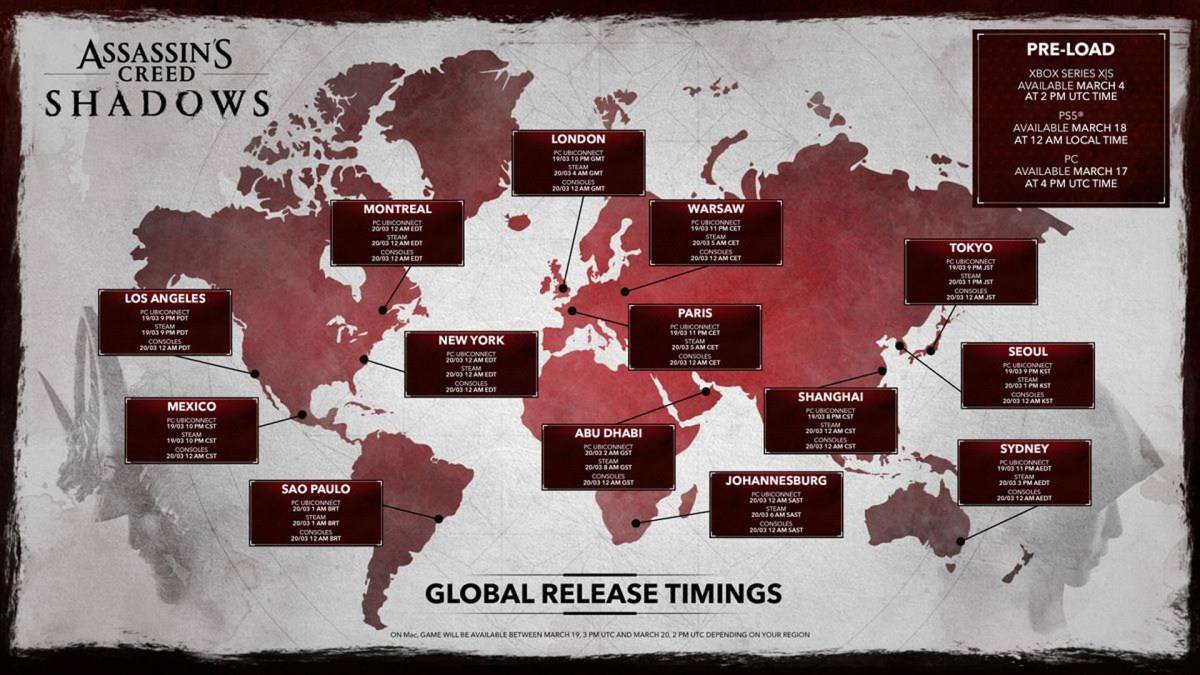
The pre-load times for *Assassin’s Creed Shadows* differ across platforms. Although the official *Assassin’s Creed* account initially shared the details via a tweet that has since been deleted, the information is still widely available. Here are the pre-load times you need to know:
Assassin’s Creed Shadows Xbox Series X|S Pre-Load Times
You can start pre-loading *Assassin’s Creed Shadows* on Xbox Series X|S from March 4th at 2 PM UTC. That means it's already available for pre-loading. If you have a slower internet connection, now is the perfect time to start downloading to save yourself some wait time.
Assassin’s Creed Shadows PlayStation 5 Pre-Load Times
For PlayStation 5 users, the wait is a bit longer. You can begin pre-loading *Assassin’s Creed Shadows* from March 18 at 12 AM local time. As soon as the clock strikes midnight on March 18, you can kick off the download process.
Assassin’s Creed Shadows PC Pre-Load Times
PC players can pre-load *Assassin’s Creed Shadows* starting March 17 at 4 PM UTC. Here are the corresponding times for various time zones:
- Pacific Time – Mon, 17 Mar 2025 at 09:00 AM PDT
- Eastern Time – Mon, 17 Mar 2025 at 12:00 PM EDT
- Greenwich Mean Time – Mon, 17 Mar 2025 at 4:00 PM GMT
- Central European Time – Mon, 17 Mar 2025 at 5:00 PM CET
- Japan Standard Time – Tue, 18 Mar 2025 at 1:00 AM JST
- Australian Eastern Time – Tue, 18 Mar 2025 at 3:00 AM AEDT
If you're in Australia, your pre-load time will begin on March 18. Unfortunately, Ubisoft has not yet confirmed pre-load times for Mac users.
How Much Hard Disk Space Do You Need to Pre-Load Assassin’s Creed Shadows?
The space requirement for *Assassin’s Creed Shadows* varies by platform, but the Apple Mac store indicates a need for 114.5 GB of hard disk space. This is a substantial amount, especially if you haven't upgraded your console's storage.
To accommodate this, you have three main options: delete some existing games to free up space, upgrade your console or PC storage, or transfer older games to a USB drive. The latter is particularly useful if you have several PS4 or Xbox One games on your console. Simply connect a USB hard drive and move those games over. While they may load slightly slower, you'll free up significant SSD space, allowing you to pre-load *Assassin’s Creed Shadows* without a hitch.
That covers all the *Assassin’s Creed Shadows* pre-load times and storage requirements for PC, PS5, and Xbox. Get ready to embark on your next adventure in the world of *Assassin’s Creed*!
 Latest Articles









 Latest Games