Home
Home  Navigation


Motion sickness can really put a damper on enjoying first-person games, turning a thrilling adventure into a queasy ordeal. If you've started playing Avowed and are experiencing this, don't worry—we've got some tips to help. The key is tweaking the settings to find your sweet spot.
Recommended Videos Jump To:
--------
The Best Settings to Reduce Motion Sickness in Avowed
How to Remove Head Movement and Camera Shake
How to Fix the Field of View and Motion Blur
What If You’re Still Feeling Motion Sick?
The Best Settings to Reduce Motion Sickness in Avowed
In most first-person games, motion sickness often stems from head movement, field of view, and motion blur. Avowed is no exception.
How to Remove Head Movement and Camera Shake
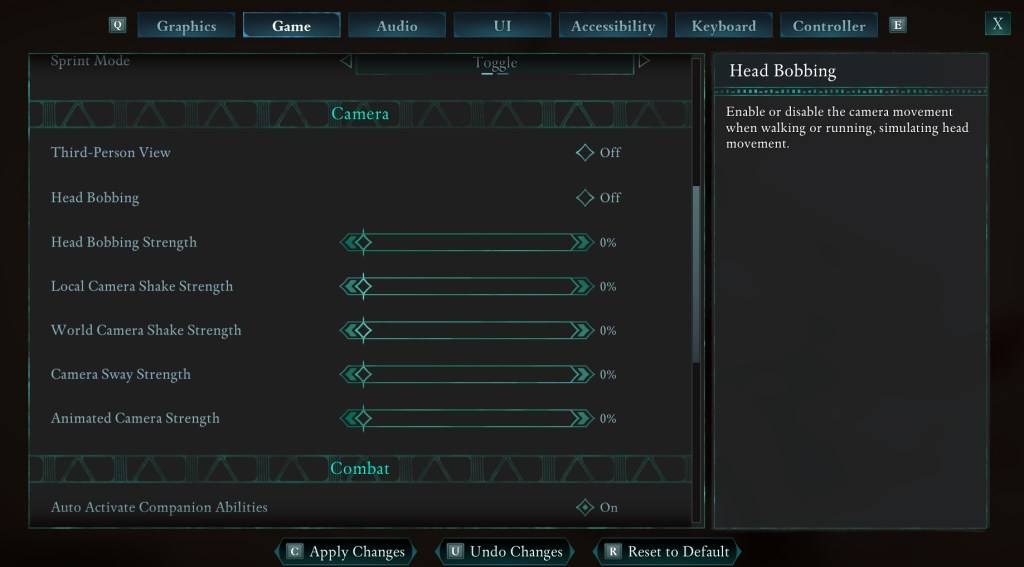
Let's tackle head movement and camera shake first. These are often the biggest culprits. Navigate to the Settings menu, select the "Game" tab, and find the "Camera" section. Adjust these settings as follows:
- Third-Person View: On or Off (your preference).
- Head Bobbing: Off
- Head Bobbing Strength: 0%
- Local Camera Shake Strength: 0%
- World Camera Shake Strength: 0%
- Camera Sway Strength: 0%
- Animated Camera Strength: 0%
In many cases, these adjustments will significantly reduce motion sickness. Experiment with these settings to find the balance between immersion and comfort.
How to Fix the Field of View and Motion Blur
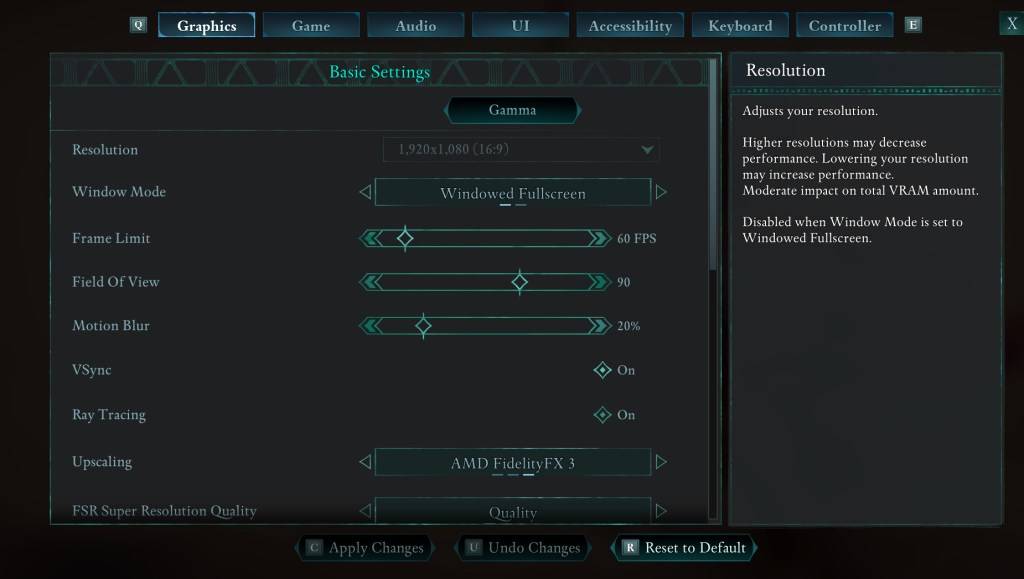
If eliminating head bobbing and camera shake isn't enough, head to the "Graphics" tab in the Settings menu. You'll find "Field of View" and "Motion Blur" sliders. Here's what to do:
- Field of View: Start with a lower Field of View and gradually increase it until you find a comfortable setting. This might require some experimentation.
- Motion Blur: Reducing or completely disabling Motion Blur often helps alleviate motion sickness. Try setting it to zero and adjust as needed.
What If You’re Still Feeling Motion Sick?
If you're still experiencing motion sickness, continue fine-tuning the settings above. Consider switching between first-person and third-person views as needed. If all else fails, don't push yourself. Take a break, drink some water, and try again later.
These are our recommended settings to minimize motion sickness in Avowed. Remember, finding the right settings is a personal journey, so experiment and find what works best for you!
Avowed is available now.
 Latest Articles










 Latest Games