Home
Home  Navigation


Ragnarok Origin: ROO breathes new life into the iconic Ragnarok Online, blending stunning visuals with contemporary gameplay mechanics to create an expansive world teeming with adventure. Developed by Gravity, ROO honors the original MMORPG's essence while introducing high-quality 3D graphics, fluid animations, and a captivating open world. MAC players, often left out of the loop when it comes to top-tier mobile MMORPGs, can now rejoice. With BlueStacks Air, you can dive into Ragnarok Origin: ROO directly on your MAC, enjoying lag-free and crash-resistant gameplay. We put this to the test on a Macbook, and the results were nothing short of impressive!
The Fantasy Anime-Stylized Elements of Ragnarok Origin: ROO Come to Life on MAC Displays
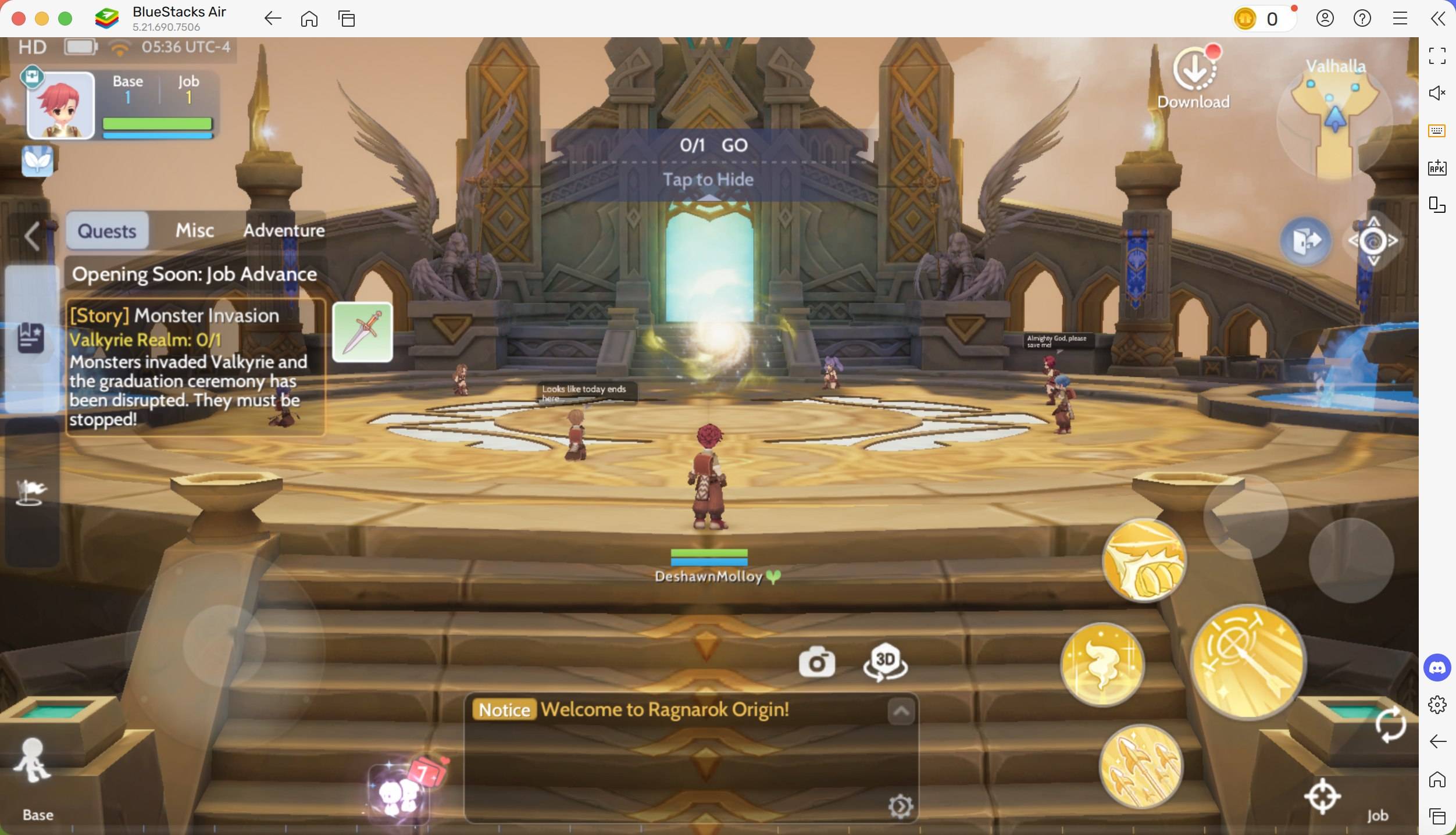
Playing Ragnarok Origin: ROO on a MAC device means you'll never be let down by the visuals. The crisp retina displays on MACs vividly showcase the rich colors and intricate textures, particularly enhancing the anime-style aesthetics of Ragnarok Origin: ROO. The game boasts lush, diverse biomes packed with environmental details. The retina display magnifies Ragnarok Origin’s visuals, showcasing vibrant colors, detailed character models, and seamless animations. With high-resolution support, you're in for an immersive and crystal-clear gaming journey.
Say farewell to the frustratingly limited visibility on mobile devices. On a MAC, you can switch to full-screen mode, making the most of the larger screen while preserving the aspect ratio for ultimate clarity. Simply press Fn + F on your keyboard, and watch the magic happen! The expanded screen size also proves advantageous in combat, offering a broader field of view for more precise aiming.
Customize Comfortably Using Keyboard and Mouse Controls
One of the most irksome aspects of playing MMORPGs on mobile is dealing with touch controls. Thanks to BlueStacks Air, you can tailor your controls for an optimized gaming experience. Utilize your keyboard and mouse to effortlessly execute skills, dodge attacks, and engage with the game world far more effectively than with touch controls.
Aiming and attacking with a mouse offers pinpoint accuracy compared to touchscreen controls. Assigning hotkeys to different abilities speeds up your combat responses significantly. In Ragnarok Origin: ROO, where your loot depends on the dungeon level's difficulty, this can make all the difference. BlueStacks offers full keymapping customization, allowing you to adapt controls to your unique playstyle. Managing your inventory becomes a breeze with drag-and-click actions, far superior to tapping on a tiny screen.
To access the pre-set controls, press SHIFT + TAB on your MAC keyboard. Feel free to tweak these settings to create your own unique control schemes. For instance, we found the constant tapping required to summon your mount for quicker travel quite annoying. By assigning a key to the mount button, you can save time and effort, especially during quests that demand a lot of travel.
Extended Gameplay without Battery Concerns or Notification Interruptions
Playing MMORPGs like Ragnarok Origin: ROO can be a time-intensive endeavor, requiring you to move frequently across different locations for quests and server-wide events. One major downside of mobile gaming is battery life. Games like ROO drain power quickly, which can lead to overheating and battery issues. Switching to a MAC device eliminates these concerns, offering uninterrupted gameplay without the limitations of mobile battery capacity.
Additionally, mobile devices are notorious for interrupting your gaming sessions with calls, messages, and notifications. Using BlueStacks Air on a Mac allows for a distraction-free experience. No more worrying about getting disconnected during crucial boss battles because of an incoming call. Playing on a Mac ensures that pop-ups from social media or other apps won't interrupt your immersion in the fantasy world of Ragnarok Origin: ROO.
How to Install and Start Playing Ragnarok Origin: ROO on BlueStacks Air
Setting up BlueStacks Air on your MAC is a quick and hassle-free process. In just a few minutes, you can be playing your favorite games with enhanced performance. Here's how to start enjoying Ragnarok Origin: ROO on your Mac:
- Download BlueStacks Air: Visit the game's page and click on the "Play Ragnarok Origin: ROO on MAC" button to download the installer.
- Install BlueStacks Air: Double-click the BlueStacksInstaller.pkg file and follow the wizard to complete the installation.
- Launch and Sign-In: Open BlueStacks Air from the Launchpad or Applications folder. Sign in with your Google account to access the Play Store.
- Install Ragnarok Origin: ROO: Search for Ragnarok Origin: ROO in the Play Store and install it.
- Enjoy the Game! Launch the application and embark on a quest to uncover the hidden treasures within ancient dungeons!
Playing Ragnarok Origin on a Mac with BlueStacks Air offers a myriad of benefits, from superior visuals and enhanced controls to extended gameplay free from interruptions. The optimized performance of a MAC, coupled with its crisp retina display and seamless keyboard and mouse controls, makes it a far superior option to mobile gaming. If you're aiming for the ultimate ROO experience, transitioning to a Mac with BlueStacks Air is undoubtedly the way to go!
 Latest Articles










 Latest Games